
用瑞佑的控制芯片实现淡入淡出,半透效果
2020-12-25
通过瑞佑的液晶控制芯片可以很容易实现半透明效果、淡入淡出效果,具备该功能的型号有RA8889,RA8876,RA8876M,RA8877,RA8871M,RA8873M等等,仅需要单片机控制,代码简单易用.
代码举例:
**
BTE_Alpha_Blending(0,2736,500,300,0,2736,1024,0,0,2736,1100,400,200,200,16);
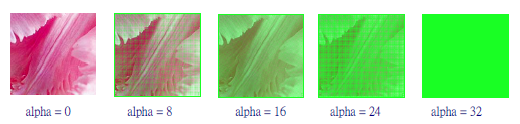
实现效果参考视频:
http://v.youku.com/v_show/id_XMTM0MzQzNzY0NA==.html?f=26097383&from=y1.2-3.4.1
通过上位机操作说明视频:
http://v.youku.com/v_show/id_XOTQwMTI2OTMy.html
函数使用说明:
**
void BTE_Alpha_Blending
(

unsigned long S0_Addr //Start address of Source 0

,unsigned short S0_W //image width of Source 0 (recommend = canvas image width)

,unsigned short XS0 //coordinate X of Source 0

,unsigned short YS0 //coordinate Y of Source 0

,unsigned long S1_Addr //Start address of Source 1

,unsigned short S1_W //image width of Source 1 (recommend = canvas image width)

,unsigned short XS1 //coordinate X of Source 1

,unsigned short YS1 //coordinate Y of Source 1

,unsigned long Des_Addr //start address of Destination

,unsigned short Des_W //image width of Destination (recommend = canvas image width)

,unsigned short XDes //coordinate Y of Destination

,unsigned short YDes //coordinate Y of Destination

,unsigned short X_W //Width BTE Window

,unsigned short Y_H //Length BTE Window

,unsigned char alpha

//alpha : Alpha Blending effect 0 ~ 32, Destination data = (Source 0 * (1- alpha)) + (Source 1 * alpha)

)

				分享到: