
NAND FLASH的调用
2020-09-14
RA8889,RA8876,RA8877,RA8873及RAA8871系列控制器 内建 SPI master 接口,此功能主要使为了使用外部闪存/ROM,支持的协议有 4-BUS (Normal Read)、 5-BUS (FAST Read)、 Dual mode 0、 Dual mode 1 与 Mode 0/Mode 3。
外部串行flash我们支持市面上大部分的NOR FLASH,若客户需要用到大容量NAND FLASH,我们的芯片支持华邦的W25N01GYZEIT,更换为NAND FLASH后DMA的调用则与NOR FLASH有点不同,操作如下:
需要将flash中的图片先调到显存中,再用BTE搬用显示,
调取函数如下
**
void SPI_NAND_DMA (unsigned long dma_page_addr,unsigned long X_coordinate,unsigned long Y_coordinate,unsigned int picture_Width,unsigned int picture_Height,unsigned long pic_buffer_Layer,unsigned long Show_pic_Layer,unsigned char chorma,unsigned long Background_color)
{


#ifdef MCU_8bit_ColorDepth_8bpp

  Background_color_256(Background_color);

#endif

#ifdef MCU_8bit_ColorDepth_16bpp

  Background_color_65k(Background_color);

#endif

#ifdef MCU_8bit_ColorDepth_24bpp

  Background_color_16M(Background_color);

#endif

#ifdef MCU_16bit_ColorDepth_16bpp

  Background_color_65k(Background_color);

#endif

#ifdef MCU_16bit_ColorDepth_24bpp_Mode_1

  Background_color_16M(Background_color);

#endif

#ifdef MCU_16bit_ColorDepth_24bpp_Mode_2

  Background_color_16M(Background_color);

#endif


nSS_Active();

SPI_Master_FIFO_Data_Put(0x13);  //page data read(13h)

SPI_Master_FIFO_Data_Put(0x00);  //8Dummy clock

SPI_Master_FIFO_Data_Put((dma_page_addr)>>8);   //page address MSB

SPI_Master_FIFO_Data_Put(dma_page_addr);   //page address LSB

nSS_Inactive();

delay_us(50); //delay for buffer load


Memory_Linear_Mode();

SFI_DMA_Source_Start_Address(dma_page_addr);//24bit address


#if defined  MCU_8bit_ColorDepth_8bpp

SFI_DMA_Transfer_Number(picture_Width*picture_Height);//picture Width x Height x Color depth(8/8=1)

#endif

#if defined  MCU_8bit_ColorDepth_16bpp

SFI_DMA_Transfer_Number(picture_Width*picture_Height*2);//picture Width x Height x Color depth(16/8=2)

#endif

#if defined  MCU_16bit_ColorDepth_16bpp

SFI_DMA_Transfer_Number(picture_Width*picture_Height*2);//picture Width x Height x Color depth(16/8=2)

#endif

#if defined  MCU_8bit_ColorDepth_24bpp

SFI_DMA_Transfer_Number(picture_Width*picture_Height*3);//picture Width x Height x Color depth(24/8=3)

#endif

#if defined  MCU_16bit_ColorDepth_24bpp_Mode_1

SFI_DMA_Transfer_Number(picture_Width*picture_Height*3);//picture Width x Height x Color depth(24/8=3)

#endif

#if defined  MCU_16bit_ColorDepth_24bpp_Mode_2

SFI_DMA_Transfer_Number(picture_Width*picture_Height*3);//picture Width x Height x Color depth(24/8=3)

#endif

SFI_DMA_Destination_Start_Address(pic_buffer_Layer);//DMA to Memory Address 1280*480*3


Start_SFI_DMA();

Check_2D_Busy();


  BTE_S0_Color_24bpp();

  BTE_S0_Memory_Start_Address(pic_buffer_Layer); //S0 Address 1280*480*3

  BTE_S0_Image_Width(picture_Width);

  BTE_S0_Window_Start_XY(0,0);


  BTE_Destination_Color_24bpp();

  BTE_Destination_Memory_Start_Address(Show_pic_Layer);

  BTE_Destination_Image_Width(canvus_width);

  BTE_Destination_Window_Start_XY(X_coordinate,Y_coordinate);


 if(chorma==0)

 {

  BTE_ROP_Code(12);

  BTE_Operation_Code(0x02);

 }

 if(chorma==1)

 {

  BTE_Operation_Code(0x05);

 }

  BTE_Window_Size(picture_Width,picture_Height);

  BTE_Enable();

  Check_BTE_Busy();

  Memory_XY_Mode();

}
直接将此函数添加进API并调用即可,如果使用本公司提供的开发板且须添加初始化函数SPI_NAND_initial_1 (void)初始化或者SPI_NAND_initial_0 (void)选择CS0还是CS1
**
void SPI_NAND_initial_1 (void)
{

  Memory_Linear_Mode();


SPI_Clock_Period(0);


//  Reset_CPOL();

Set_CPOL();

// Reset_CPHA();

    Set_CPHA();


Select_nSS_drive_on_xnsfcs1();

W25N01_Device_Reset();

W25N01_Clear_BUF();

W25N01_Set_ECC();


//Select_standard_SPI_Mode0_or_Mode3();

Select_RA8875_SPI_Mode0_and_Mode3();


//Select_SFI_Single_Mode_Dummy_0T_03h();

Select_SFI_Single_Mode_Dummy_8T_0Bh();

//Select_SFI_Single_Mode_Dummy_16T_1Bh();

//Select_SFI_Dual_Mode_Dummy_8T_3Bh();

//Select_SFI_Dual_Mode_Dummy_4T_BBh();


Enable_SFlash_SPI();

Select_SFI_1();

Select_SFI_DMA_Mode();

Select_SFI_24bit_Address();


Memory_XY_Mode();


}

void SPI_NAND_initial_0 (void)

{

  Memory_Linear_Mode();


SPI_Clock_Period(0);


//  Reset_CPOL();

Set_CPOL();

// Reset_CPHA();

    Set_CPHA();


Select_nSS_drive_on_xnsfcs0();

W25N01_Device_Reset();

W25N01_Clear_BUF();

W25N01_Set_ECC();


//Select_standard_SPI_Mode0_or_Mode3();

Select_RA8875_SPI_Mode0_and_Mode3();


//Select_SFI_Single_Mode_Dummy_0T_03h();

Select_SFI_Single_Mode_Dummy_8T_0Bh();

//Select_SFI_Single_Mode_Dummy_16T_1Bh();

//Select_SFI_Dual_Mode_Dummy_8T_3Bh();

//Select_SFI_Dual_Mode_Dummy_4T_BBh();


Enable_SFlash_SPI();

Select_SFI_0();

Select_SFI_DMA_Mode();

Select_SFI_24bit_Address();


Memory_XY_Mode();

}
使用范例:
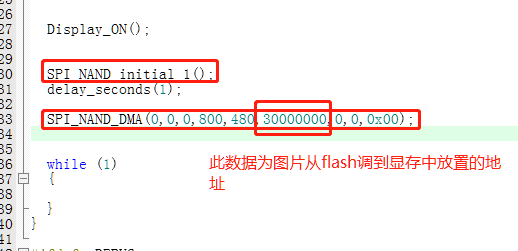
注意图片放置地址不可超出显存大小,例:分辨率为800480 、24bpp放置到第二个图层则为800480*3 即1152000
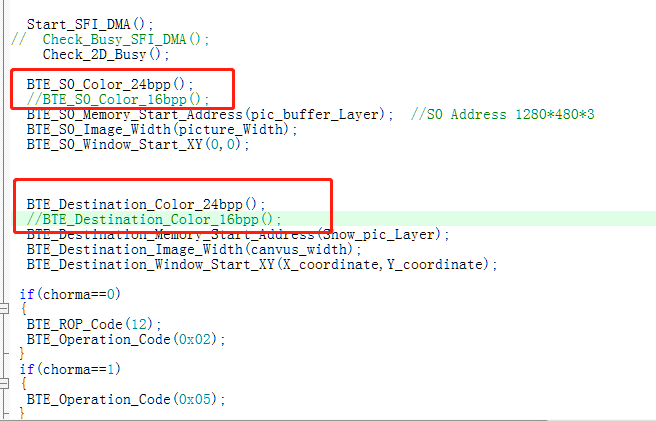
这里要根据图片实际信息进行设置
分享到: